Before I send you over to the Tetris battleground, I must first arm you with the right weapon and posture.
Choosing Your Weapon
To begin any battle, you must first choose your weapon of choice. There are many options.
Tetris can be played with various input devices.
The most bare-bones method is to use your phone’s touchscreen to play a free phone version of Tetris.
The other, less crude method is to use your mouse to play the free browser-based version of Tetris on Tetris.com.
However, most players choose between keyboards and controllers, depending on the console they are playing Tetris on.
1. Controllers
Tetris can be played on desktops or laptops, Nintendo Switches, Xboxes, Playstations, or other consoles, with controllers.
This can come in a variety of ways, such as:
| Diagram Set 2-1 |
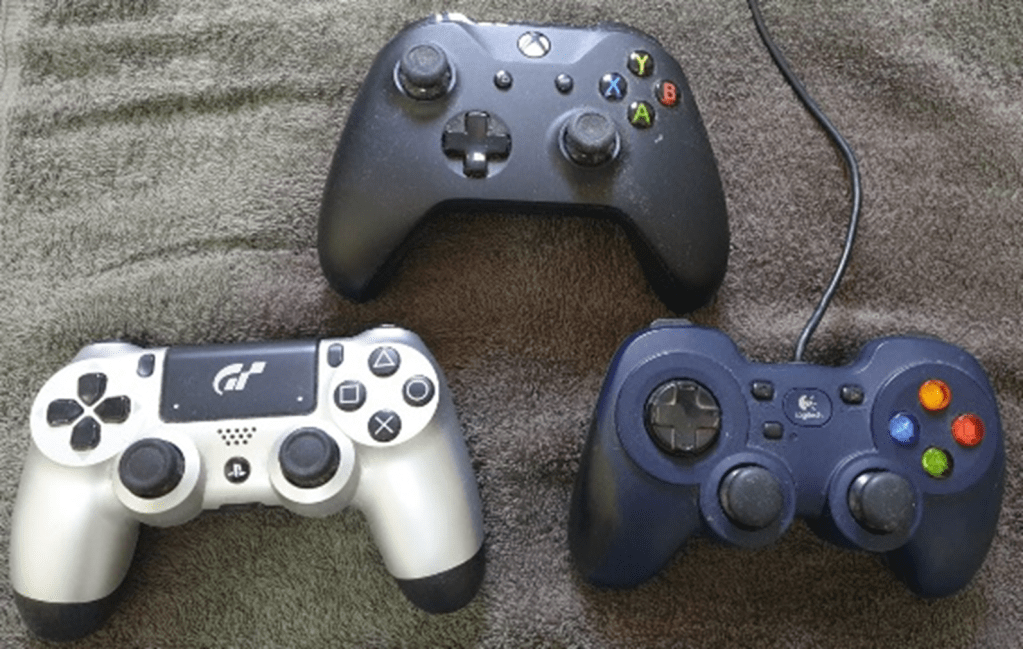
| My previous Tetris controllers for the PS4, Xbox, and PC. |
I have tried 4 different controllers: the Switch Joy-Cons, the PS4 controller, the Xbox controller, and the Logitech F310.
They are all acceptable and comfortable for Tetris.
However, other variants also exist, such as Razer’s mechanical keyboard controllers or custom ones by 8bitDo.
2. Keyboards
Many serious players use keyboards because they minimize the distance their fingers travel.
I recommend a decent mechanical keyboard for Tetris. If you are using a laptop’s scissor-switch keyboard, it is fine, too.
However, low-quality rubber dome membrane desktop keyboards are likely to be worn out from excessive Tetris gameplay in just 6 months:
| Diagram Set 2-2 |
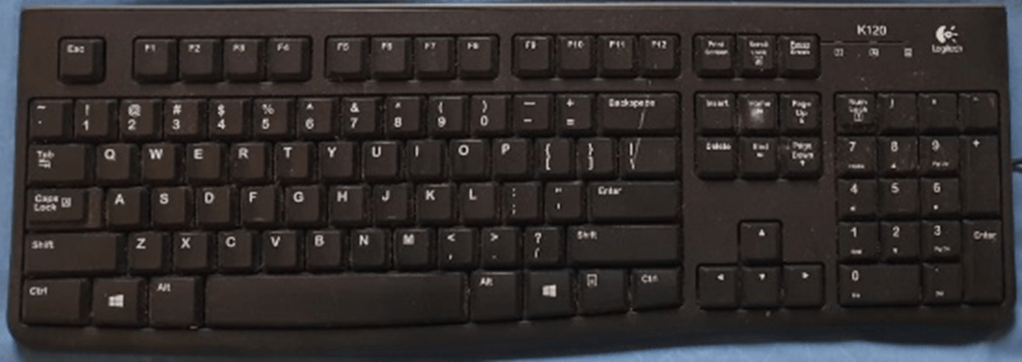
| A K120 rubber dome membrane keyboard. Not recommended for Tetris! |
Keyboards that use the scissor-switch mechanisms, such as this one below, are slightly better, with a higher lifespan:
| Diagram Set 2-3 |
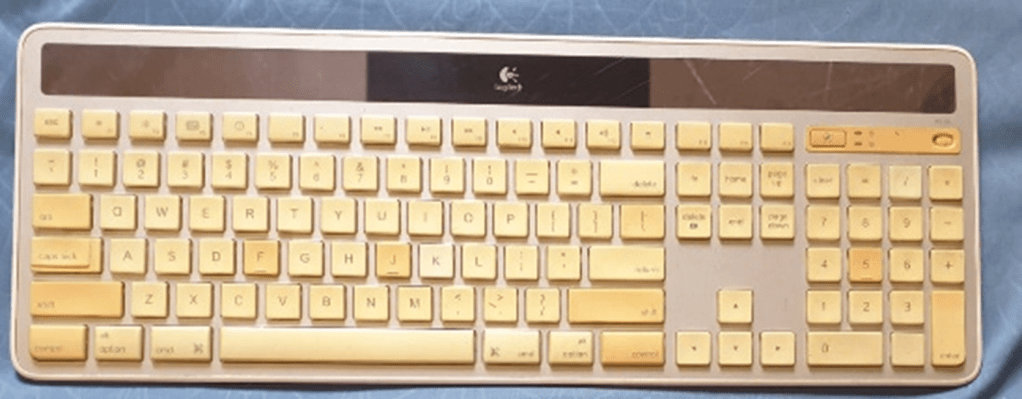
| An Apple chiclet-style (scissor-switch) keyboard. |
However, nothing matches the longevity of mechanical keyboards. Their keys last up to 50 million presses.
Here are my tested key binds on my mechanical keyboard:
| Diagram Set 2-4 |
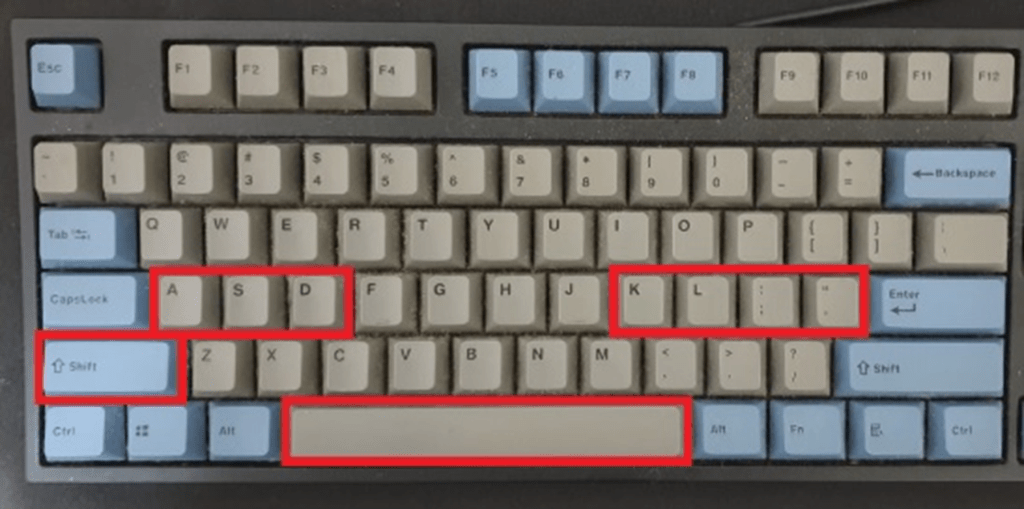
| My trusty Leopold FC750R mechanical keyboard. The red rectangles show where my main key binds are for Tetris. |
My key binds are:
| Key | Function |
| Left Shift | Soft drop |
| A | Move left |
| S | Hard drop |
| D | Move right |
| K | Rotate counterclockwise |
| L | Hold |
| ; | Rotate clockwise |
| ‘ | 180-degree rotates or zone in Tetris Effect |
| Spacebar | Miscellaneous functions |
You may use other key binds, such as the default ones that come with many Tetris versions.
Play Smart: Body and Mind
To play Tetris well, one must harmonize the body and the mind.
1. Too Much Pain, No Gain
Many players play Tetris without proper ergonomics or mental preparation, resulting in suboptimal comfort.
Here are my tested methods to maximize comfort before playing:
i. Use a Wrist Rest for a Keyboard
If you are using a laptop, you need not worry.
However, if you are using a standard keyboard attached to a desktop, a wrist rest is highly recommended, in my experience.
I have known of many players who have developed carpal tunnel syndrome from a bent wrist after playing Tetris for too many years.
This condition, however, can be permanent, causing players to lose as much as a third of their speed when long-term repetitive strain injury (RSI) sets in.
Using a wrist rest keeps the wrists straight, reducing the chances of this happening.
ii. Get a Comfortable Seat
If you are a computer user, using a chair with armrests is highly recommended. Not using one causes the arms to feel strained because the elbows must be consciously raised while playing.
Therefore, getting a proper chair with proper armrests and proper posture helps eliminate the distraction caused by aching muscles, letting you focus on the game better.
For controller users lying on a couch, this is far less of an issue, as long as the sofa is comfortable.
2. Not in the Mood?
The whole purpose of playing Tetris is to enjoy the game.
If you are not in the mood for optimal stacking, especially if you are burned out from prolonged Tetris or work, I recommend not forcing this.
As a high-level Tetris player, I often suffer from Tetris burnout from my intense research and writing on Tetris guides. After spending too much time focused on the game, I would sometimes force myself to stream Tetris on Twitch.
The result? Disaster.
I often had to end the streaming session after 2 hours because I was not enjoying the game. Likewise, it felt more performative than it was fun.
I often stream and play Tetris when my brain is still foggy and groggy from burnout, which results in less-than-splendid gameplay.
Likewise, when I was not in the mood for Tetris and tried to force myself to play or learn new methods, the techniques would not stick in my mind.
Instead, I would get frustrated, leading to terrible stacking whenever I tried to go fast, when my mind would not function any further.
The lesson from my 3000+ hours of Tetris experience? Only play Tetris whenever you are in the mood for it.
If not, take as long a break as you need to recover from Tetris burnout. It can be a month or even longer. When you come back, you will often come back with a fresh mind and perform far better.
3. Eat, Drink, and Play
Nourish yourself before playing Tetris, so you will not get distracted by hunger.
However, in my experience, the number one culprit of poor Tetris gameplay is inadequate hydration.
This has been proven scientifically—not being hydrated enough can cause your brain to slow down substantially.
From my experience, this was true: my speed and reflexes would feel sluggish whenever I went over 5 hours without drinking during my Tetris streams.
A simple drink would fix the issue (and, by that, I do not mean alcohol!).
In a Nutshell
Choose your weapon and maximize comfort and nourishment.
Outstanding Tetris performance arises from the balance between the right tool, a healthy body, and a rested mind.
| Summary |
| Get a good input device for Tetris, whether it is a keyboard or a controller. Ensure proper ergonomics, hydration, comfort, and the right mood before playing Tetris. |
 How to Tetris