Beginner Tetris players press excessively to move every mino into the required position. For instance, they may tap “move right” 4 times, then hesitate, and press “move left” 3 times, when a single “move right” press would do.
Such extra keypresses lead to inefficiencies and wasted time. Thankfully, players have developed many finesse schemes over many years to reduce this inefficiency. This guide’s finesse scheme is optimized for modern Tetris.
Finesse is a set of optimized keypresses that lock each piece into the required location.
This chapter does two things:
- It provides the ideal finesse scheme for Tetris.
- It shows tricks to improve one’s speed in Tetris.
A) Core Tricks to Improve One’s Speed
The key to being fast is not to overthink. Much of the slowdowns occur when a player is met with unfamiliar and novel situations and is forced to think of the best ways to resolve them. However, doing so takes up conscious thinking time and slows a player.
I now present a list of essential habits one can cultivate to streamline one’s decisions to increase speed indirectly.
1) Cutting Down on Thinking Time
Going for the Simplest Setups
Going for simpler setups is a quick way of improving one’s speed.
I have noticed that most beginner and intermediate players focus on building fancy, advanced, or experimental T-spin setups or others. Many of these slow down a player because:
- They have very high piece dependencies.
- They require too many pieces to plan out.
- They are not opportunistic methods.
- They make the field jagged.
Altogether, many beginner and intermediate players lose valuable time from overthinking.
Instead, I suggest prioritizing the easiest and simplest methods, like the ones below, as far as possible (these T-spin methods will be covered in a later chapter):
| Diagram Set 4-1 |
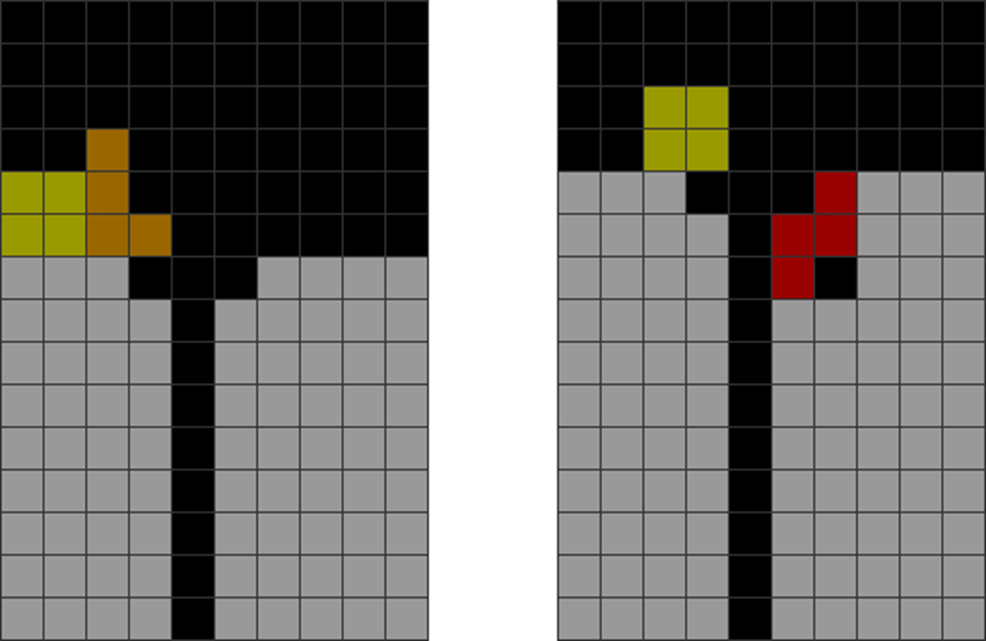
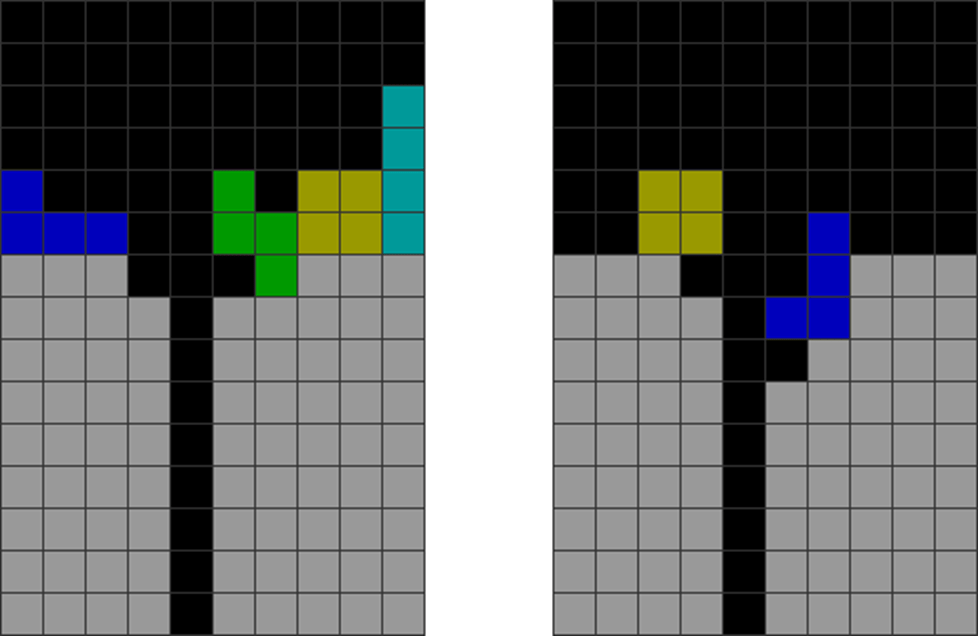
| This method involves simply stacking along a line for easy T-spin doubles and Tetrises. |
Using these easy methods more is vital because they need far less thinking time, are familiar, and do not need many piece dependencies. Because they are more familiar to produce, the more one practices, the faster one can more easily get. This is, thus, one easy way of indirectly increasing speed.
Doing this covers about 80% of all mid-game T-spins. Knowing common T-spin methods well is better than knowing a thousand complex but rarely used ones.
By mastering this method, you can keep practicing until your speed becomes fast enough.
Managing Jaggedness
Here’s the greatest secret to becoming faster in Tetris.
Contrary to popular opinion, properly managing a field’s jaggedness is the greatest secret to becoming faster.
Why is this so? See below:
| Diagram Set 4-2 | |
| A | |
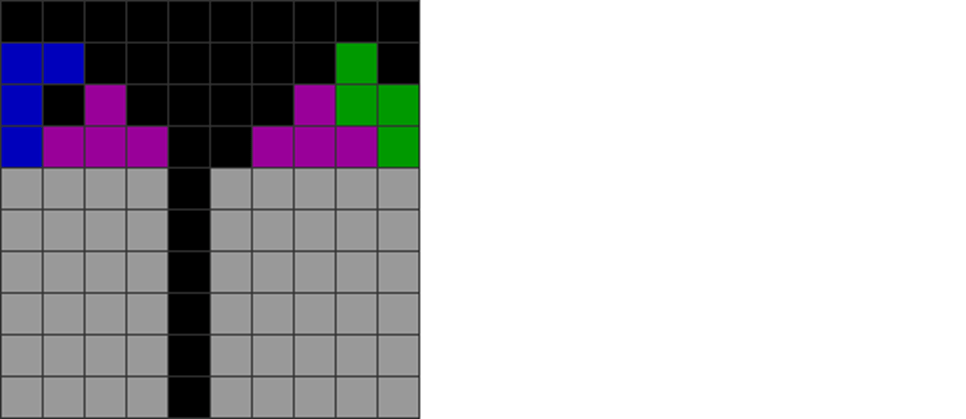
| A player makes both sides of the field jagged around the central Tetris hole. These patterns prevent L, J, and O pieces from being placed. |
A beginner player often stacks in a way that creates many jagged, imbalanced, and unstable patterns. A bumpy field also increases the danger of overstacking.
A very jagged field increases thinking time. An irregular field can place only S, Z, T, and I pieces. This restricts placements. The brain needs more time to think to resolve such setups and typically slows one down significantly.
Conversely, a skillful player knows how to stack to avoid a jagged field. They also know how to use Ts or skims to level out the field, so it is flatter quickly. This allows one to place pieces more efficiently and faster.
Using Composite Piece Placements and Common Stacking Forms
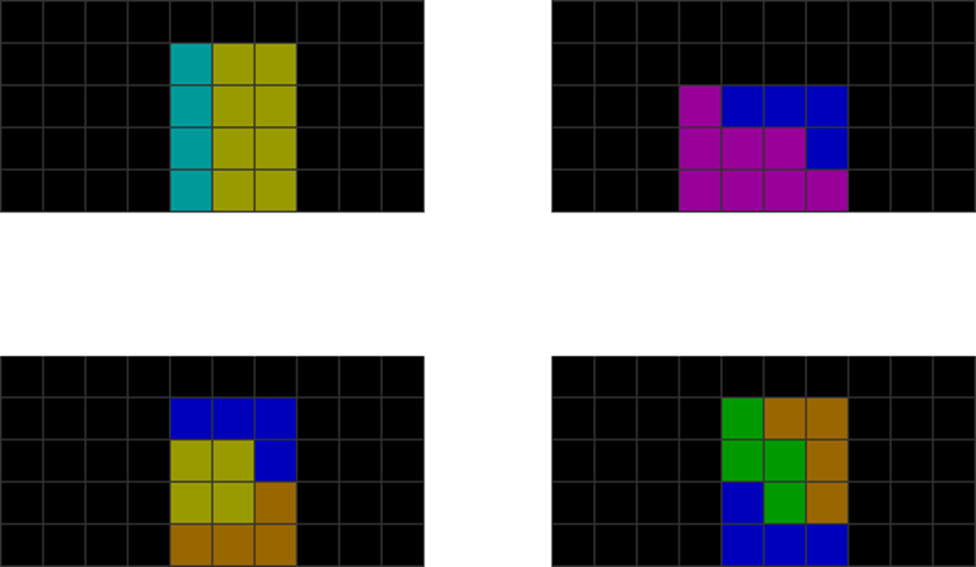
Talented players know how to “chunk” several pieces to reduce thinking time.
| Diagram Set 4-3 |
.
.
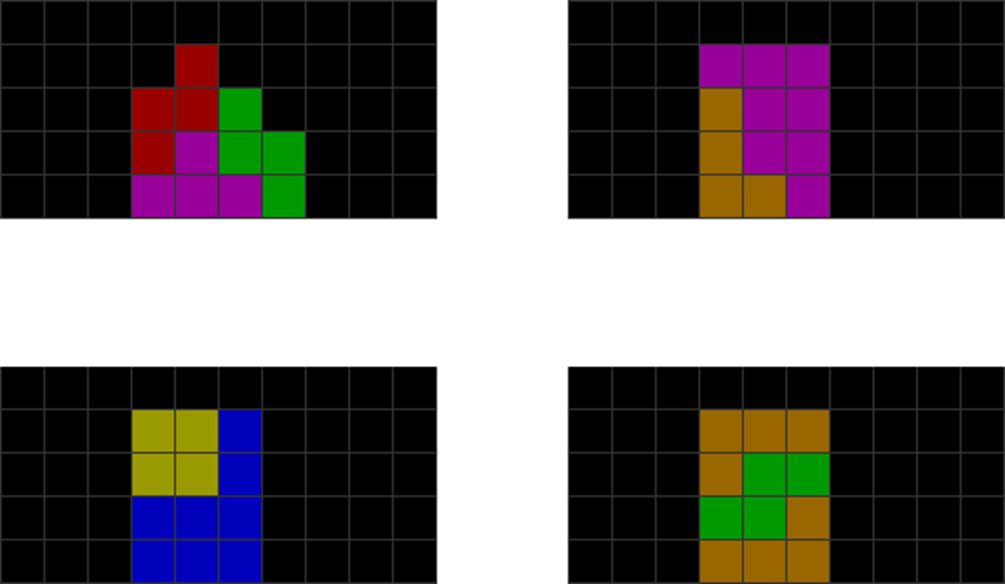
| Talented players can instantly spot how 2 or 3 pieces can form common piece combinations. This includes the above shapes, such as using OOI, TTL, LOJ, and LSL to make 3×4 rectangles. |
How does this lead to increased Tetris speed?
The brain effectively ‘chunks’ 2 or 3 pieces into one enormous piece using piece combinations. This significantly cuts down on one’s cognitive load.
Memorizing these common stacking patterns is vital, allowing further practice to increase familiarity and speed. If a player can do these effectively for many common patterns, one can indirectly increase speed.
B) 2-Step finesse
Finesse in Tetris is defined as individualized key presses that move pieces to their desired position.
However, for most beginner to intermediate players, one’s finesse scheme may not be the most efficient or optimal. To resolve this, many players resort to 2-step finesse.
This scheme provides the most optimal configuration that minimizes keypresses while playing. The maximal number of movement presses (move left or right, minus rotates) to place any piece is two at most.
Proper finesse has four categories to consider:
1) DAS Optimization
DAS (Delayed Auto-Shift) is a Tetris mechanic that makes moving pieces to the left or right more efficient. When you press and hold the “move left” or “move right” button, there’s a brief delay before the piece starts moving. After this delay, the piece accelerates and moves faster across the field.
This is more efficient than repeatedly tapping the button, as it minimizes the effort needed to move the piece to the edge of the field.
Basic DAS
Basic DAS use involves:
| Diagram Set 4-4 | |
| 1 | 2 |
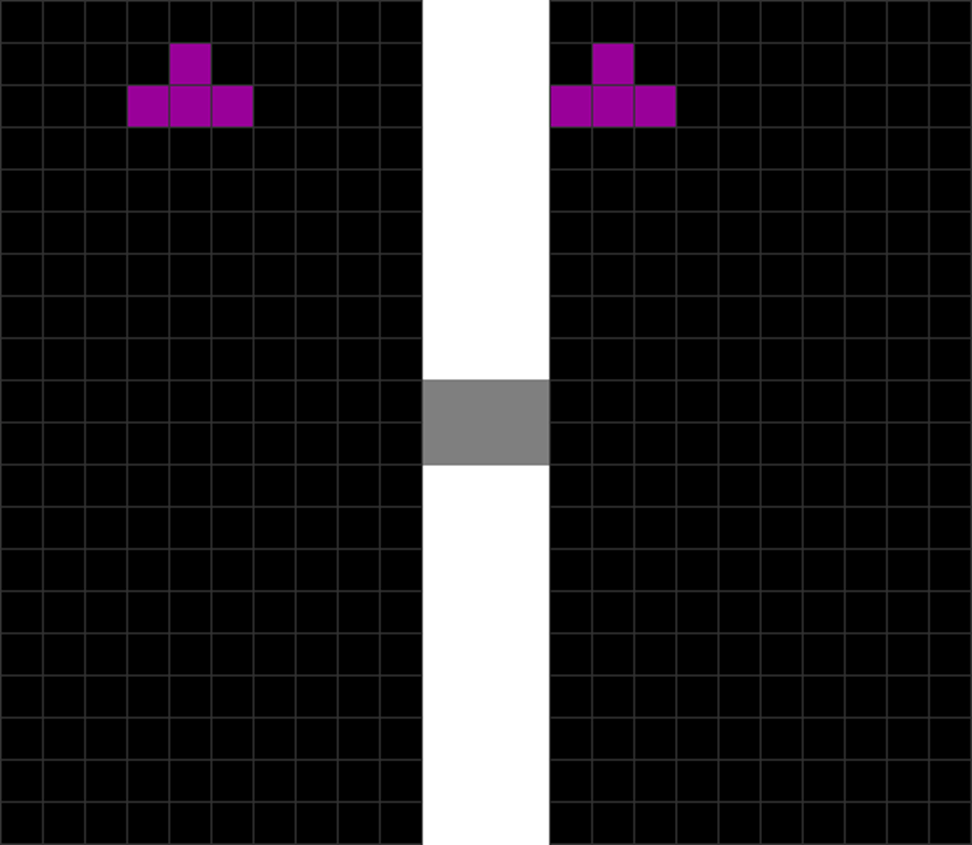
| The T piece spawns, and then the player holds “move left,” triggering DAS. | This causes the T to zoom to the field’s left side fast. |
This sequence highlights the use of basic DAS to quickly move pieces to the edges of a field.
DAS optimization refers to using this mechanism to become faster in Tetris.
It involves, before a piece spawns, holding DAS to ‘charge’ it so that the next piece auto-moves to the left or right wall quickly.
2) Using Wall Kicks
Rotate to Kick Piece Off Walls
Many players pre-rotate a piece, then DAS, and tap back off the wall. This is inefficient as it takes more keypresses. They do this using:
| Diagram Set 4-5 | |
| 1 | 2 |
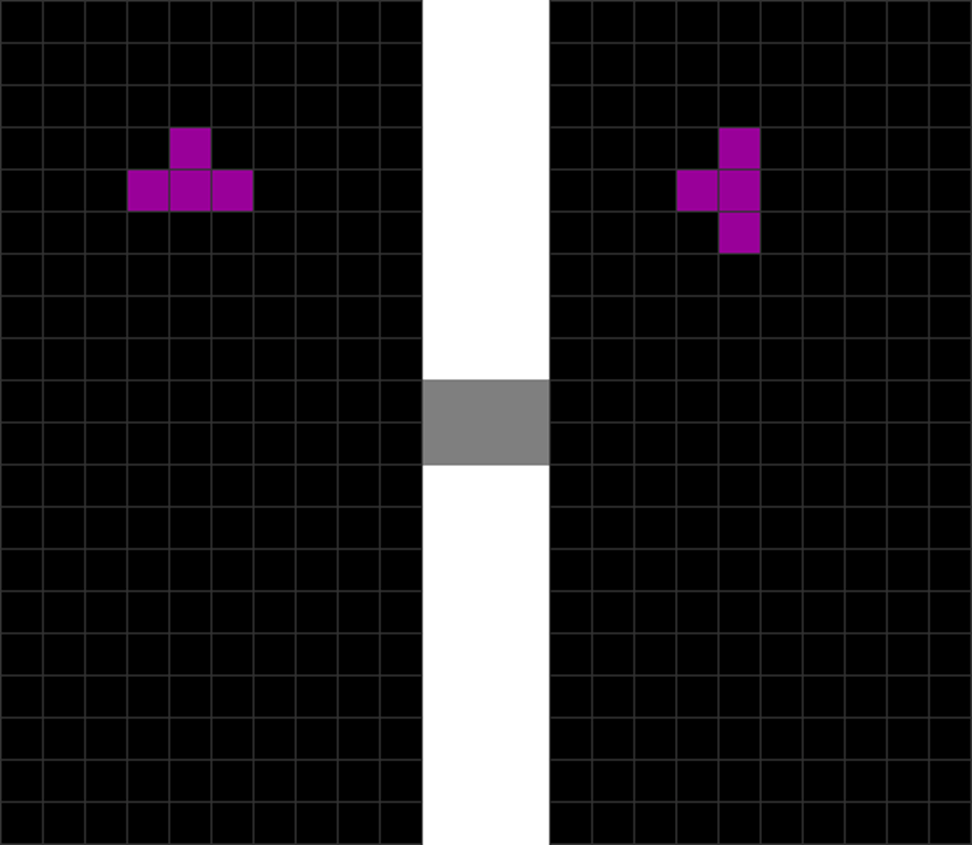
| The T piece spawns. | The player rotates T anti-clockwise. |
| 3 | 4 |
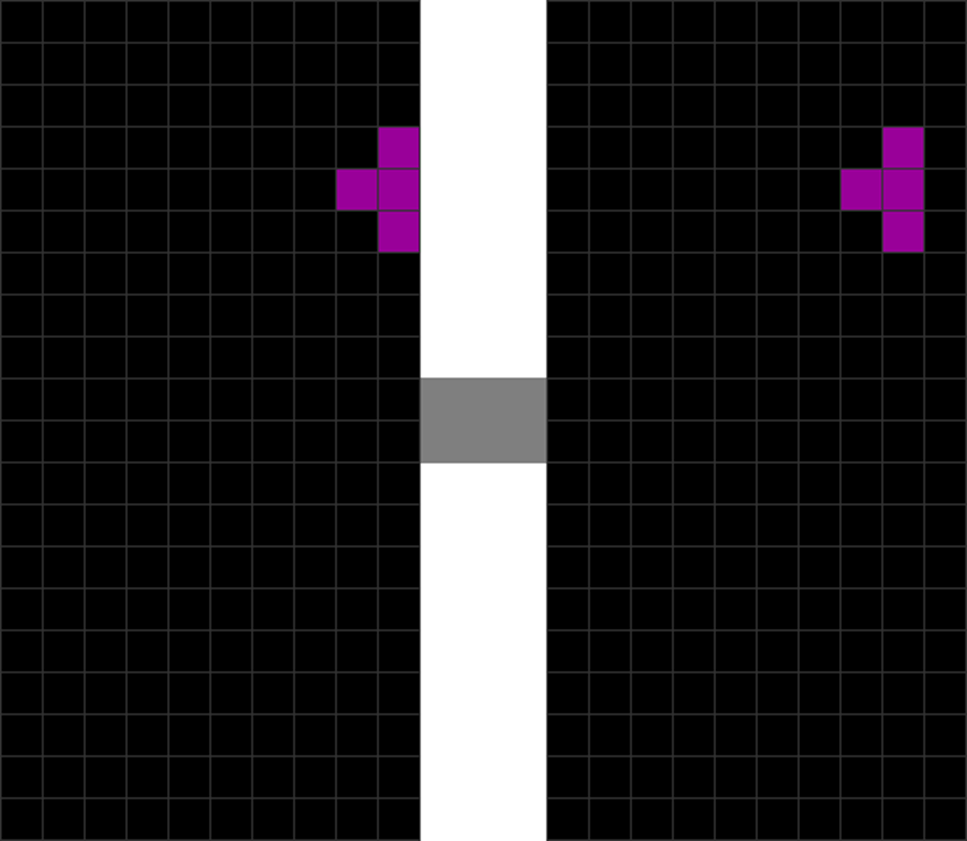
| He presses and holds “move right,” which causes T to reach the right wall fast. | The player releases DAS and presses “move left.” |
This is inefficient.
A more optimal method to cut down on one more keypress per some pieces is to DAS and rotate to wall kick off the sides like this:
| Diagram Set 4-6 | |
| 1 | 2 |
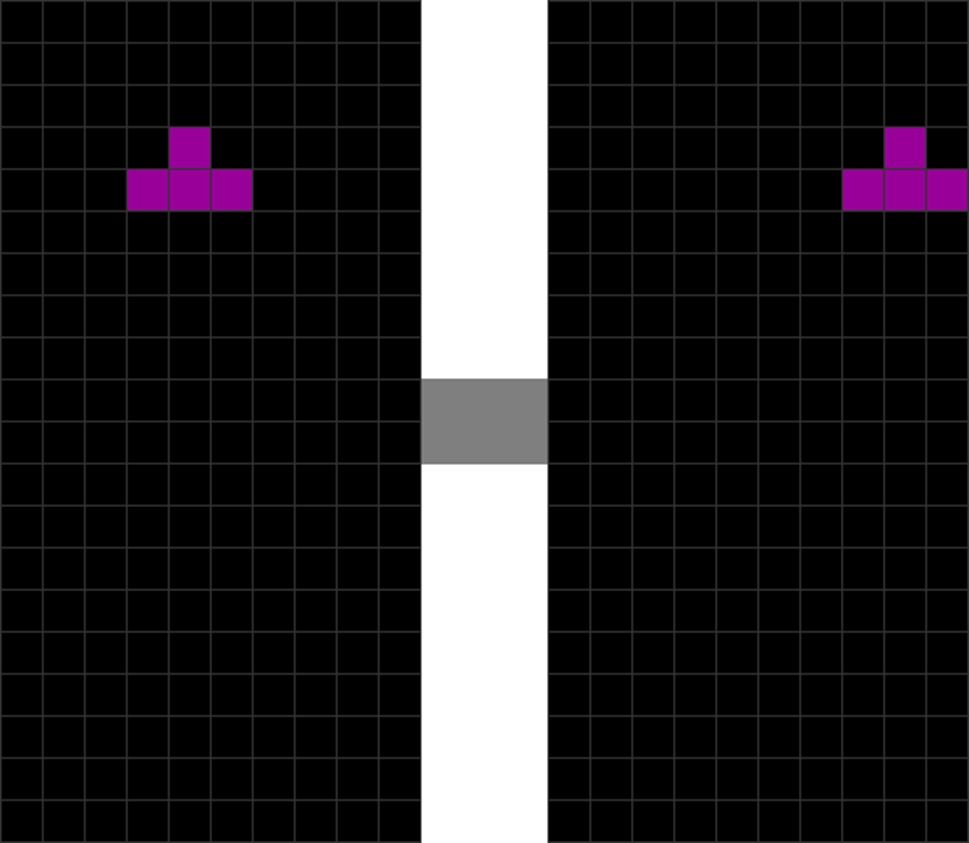
| The T piece spawns. | The player holds down “move right,” which causes the T to zoom to the right wall fast. |
| 3 |
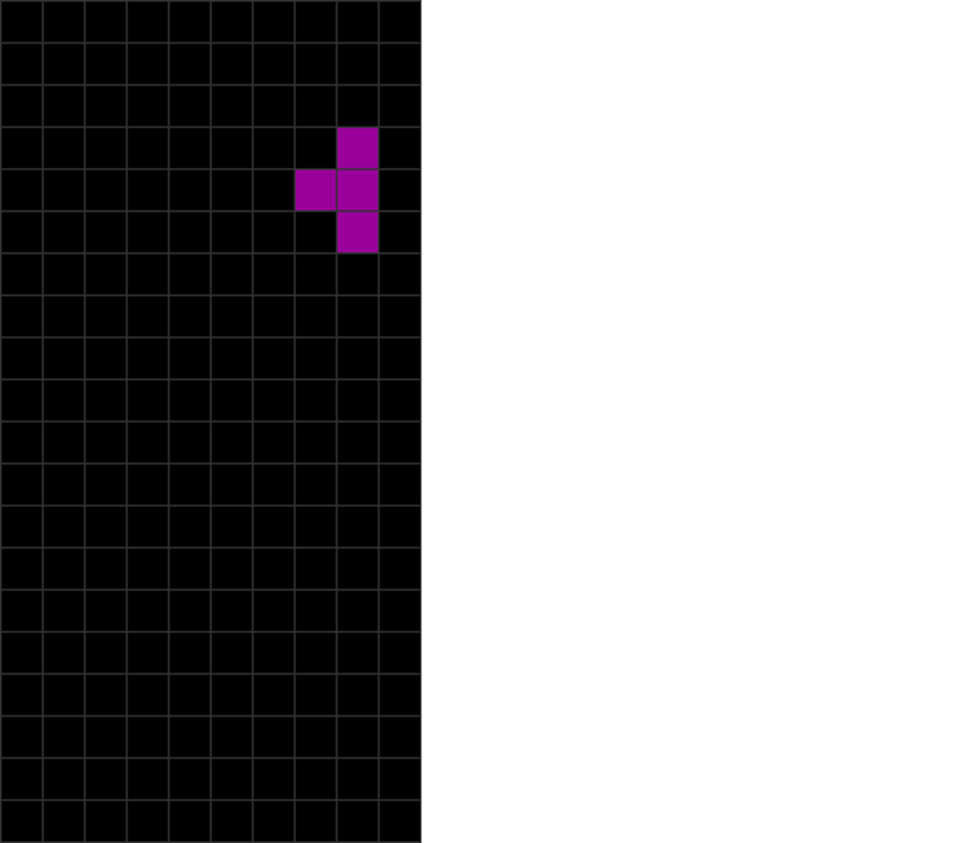
| Rotate the piece anti-clockwise, causing it to “bounce off” the wall, saving one step. |
That’s right! You don’t have to pre-rotate, DAS right, and kick back! Just DAS right and rotate will do the trick! This cuts down finesse movement by one press.
This is because of the wall kick mechanism, which affects all pieces. Here is a deeper example of what I mean:
| Diagram Set 4-7 |

| A simple mnemonic is only the ‘broad sides’ wall kick off the wall when rotated. |
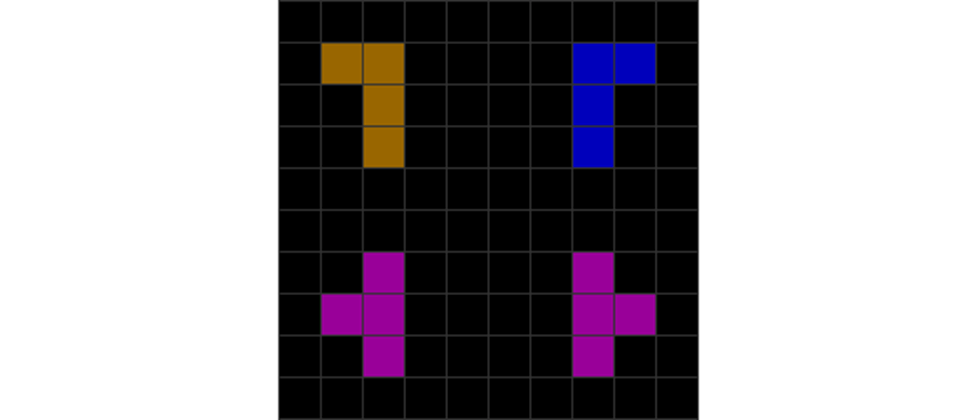
| These L, J, and T placements do not wall kick when rotating, as the sides facing the wall are not their ‘broad sides.’ |
All shown pieces above ‘kick’ off from the wall once you DAS them (initially in the default spawn position) to the left or right, then when you rotate.
Note the exceptions shown above. This lets you cut down on one key press for such finesse schemes.
Hence, I recommend using wall kicks to improve your finesse for the corner-most placements of all pieces.
3) Eliminating Extra Presses
Avoiding Triple Movement Taps
Triple movement taps to the right side are the main things that I recommend avoiding that occur in such situations:
| Diagram Set 4-8 | |
| 1 | 2 |
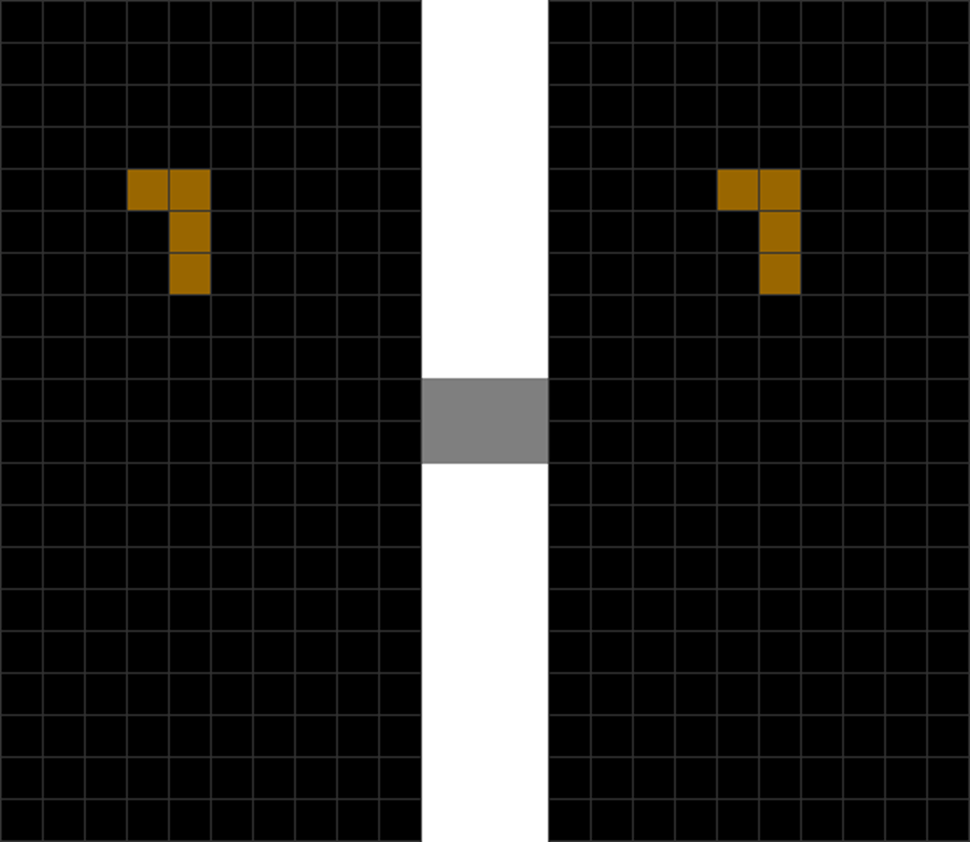
| Rotate the L piece anti-clockwise after it spawns. | You tap “move right” once. |
| 3 |
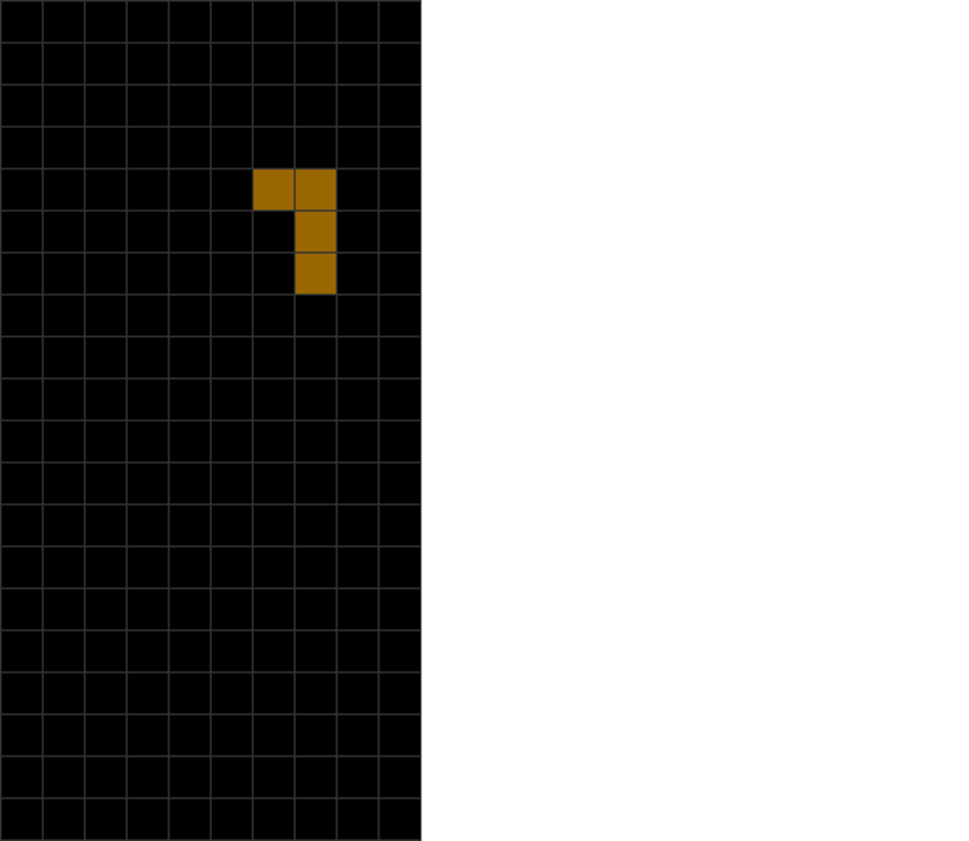
| You tap “move right” two more times. This gets it to the right position. |
This is inefficient.
Most triple-tapping happens on the right side because L, J, T, S, and Z pieces do not spawn precisely in the middle. Instead, they spawn one block to the left of the center line. Thus, these pieces need more movement to get to the right side.
What can we do to improve finesse, then?
You could instead DAS right, rotate to bounce off the wall, and press tap left at once to save one frame.
Technically, the number of keypresses is still the same. Still, you simultaneously press rotate to wall kick and tap left, which cuts down on time.
This is illustrated below:
| Diagram Set 4-9 | |
| 1 | 2 |

| The L piece spawns. | The player holds “move right” to activate DAS, causing L to rush to the right. |
| 3 |

| The player rotates anti-clockwise and taps “move left” simultaneously. |
See how much time this saves you? It saves a key press each time!
Note that this affects both the left and right sides. However, it is used mainly on the right side to prevent triple tapping. This affects primarily the S, Z, L, J, and T pieces.
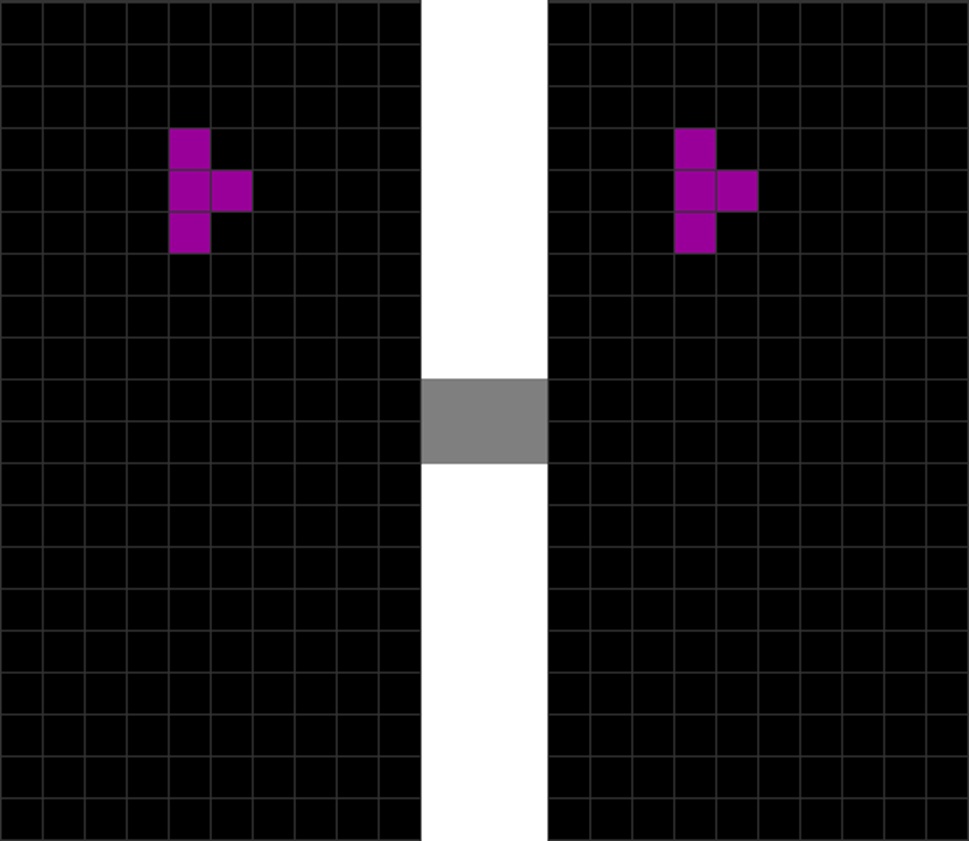
The worst triple taps I recommend avoiding are those on the left side:
| Diagram Set 4-10 | |
| 1 | 2 |
| 3 | 4 |
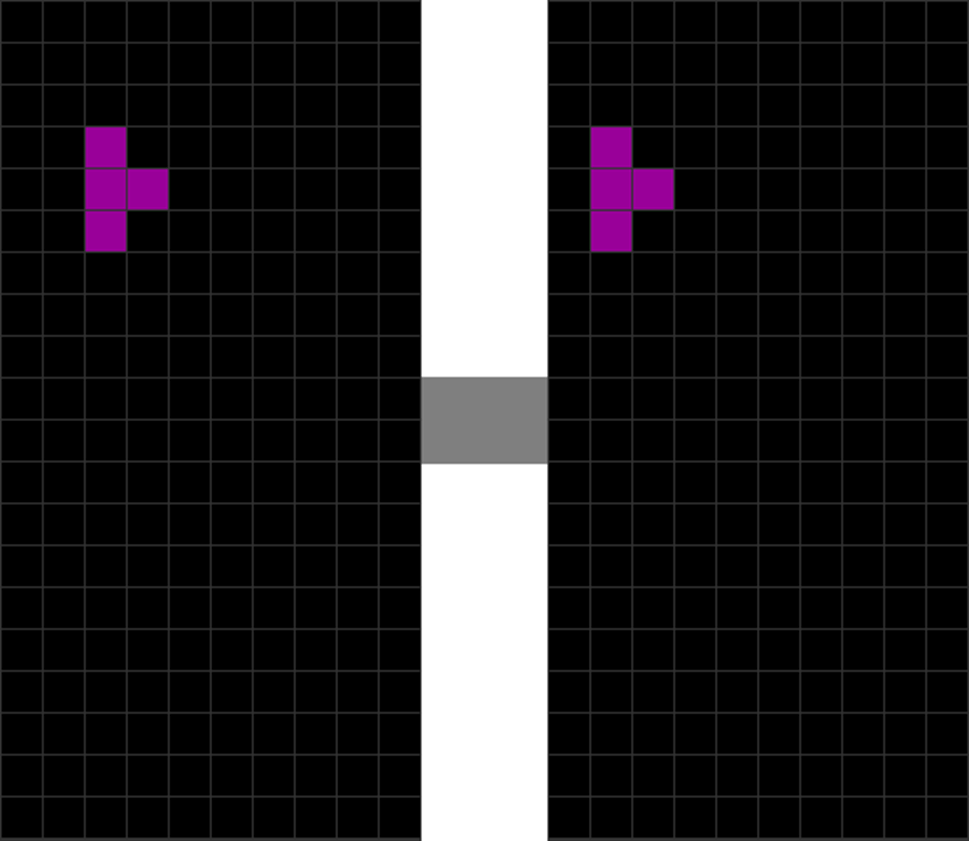
| This placement needs 3 “move left” taps instead of more optimized placements like DAS left and rotate to get T into place. |
I feel it’s essential to reduce the number of keypresses to reduce long-term finger fatigue during a single gaming session and, thus, improve endurance.
Using Both Rotates
Many Tetris beginners use only one rotation – either left or right. This is not recommended, as you may need up to 3 rotates to get some pieces in place, which slows you down tremendously.
Therefore, try to use clockwise and anti-clockwise rotate to reduce the number of finger taps to be faster and more efficient.
High Gravity Finesse
In Tetris games with high gravity, like Invictus mode in Tetris 99, or Endurance or Marathon modes in Puyo Puyo Tetris, Tetris the Grandmaster 4, and Tetris Effect, there’s a trick one could learn to deal with high gravity.
When gravity is high enough, your pieces will plunge to the bottom. This is worse when your stack is pretty high, as there is less distance for gravity to fall from the top. Therefore, you can get into these situations:
| Diagram Set 4-11 | |
| 1 | 2 |
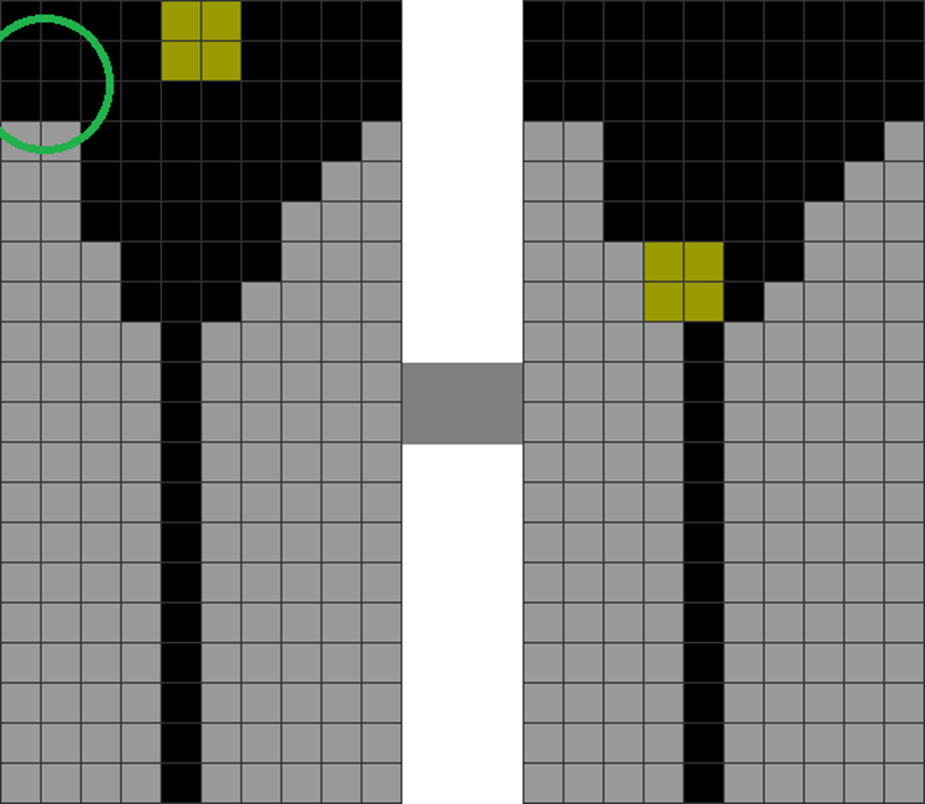
| The player wants to move the O piece to the green-circled area. However, gravity pulls it down nearly instantly in step 2. |
However, the trick to overcome such hurdles is to stack in the following ways:
| Diagram Set 4-12 | |
| 1 | 2 |
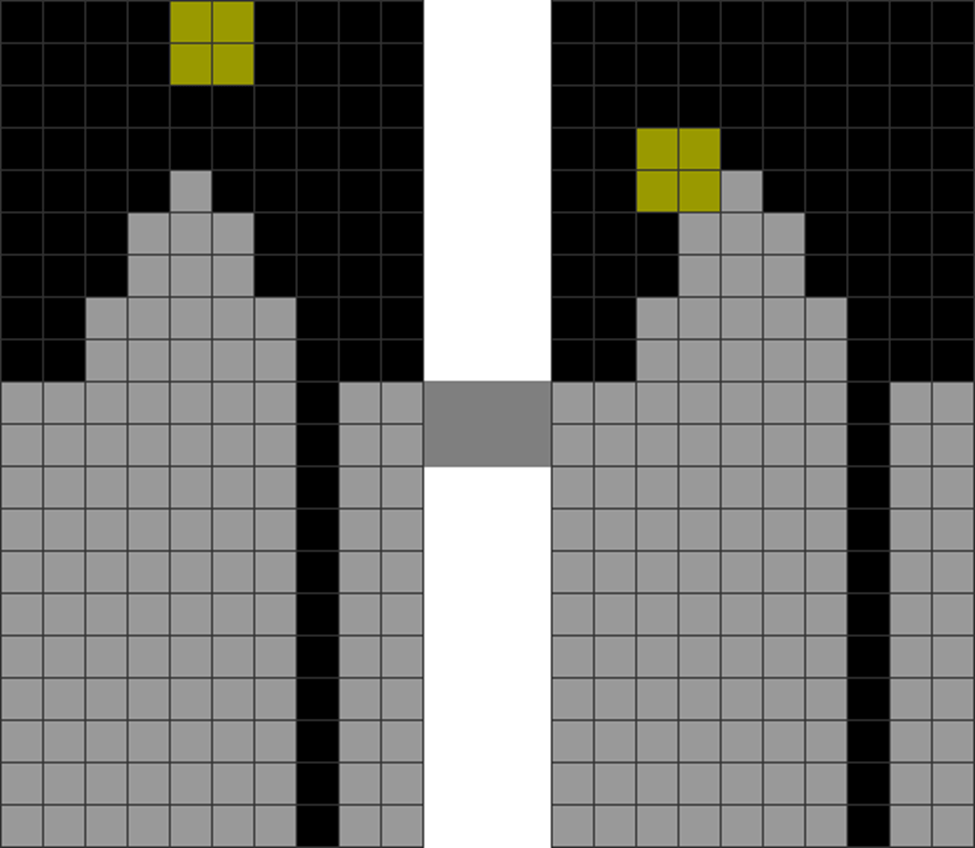
| The player creates a “mound-like” pattern in the middle. This makes the center higher than the left and right sides. | Because of Tetris gravity mechanics, this lets you ‘slide’ the O piece around the center to the edges without it locking too soon. |
| 3 |

| This enables the player to better get the O piece to the far left. |
Wiggling Pieces
When gravity is too high, you can wiggle your pieces repeatedly by pressing any movement or rotating pieces. This buys some time before a piece locks. This, however, may not work in Classic Tetris, where pieces lock far sooner.
Summary and Conclusion
There may not be the best or universal finesse scheme for all. Some players may differ slightly in their finesse schemes, but it’s alright if it is optimized for the required situation.
Although practice is the number one factor in increasing one’s speed, this chapter has outlined many other factors that one can easily follow to improve one’s speed.
| Concept | Summarized Rules-of-Thumb |
| Flow | Go for the most straightforward setups that need the least thinking time. Commit 2-step finesse to memory. Minimize double and triple tap placements. |
| Form | Stack flatly, minimize field division, and manage jaggedness properly to avoid dead-ends that slow thinking. Memorize all common composite piece placements to reduce cognitive load. |
| Balance | Minimize soft drops. |
 How to Tetris